
Desks

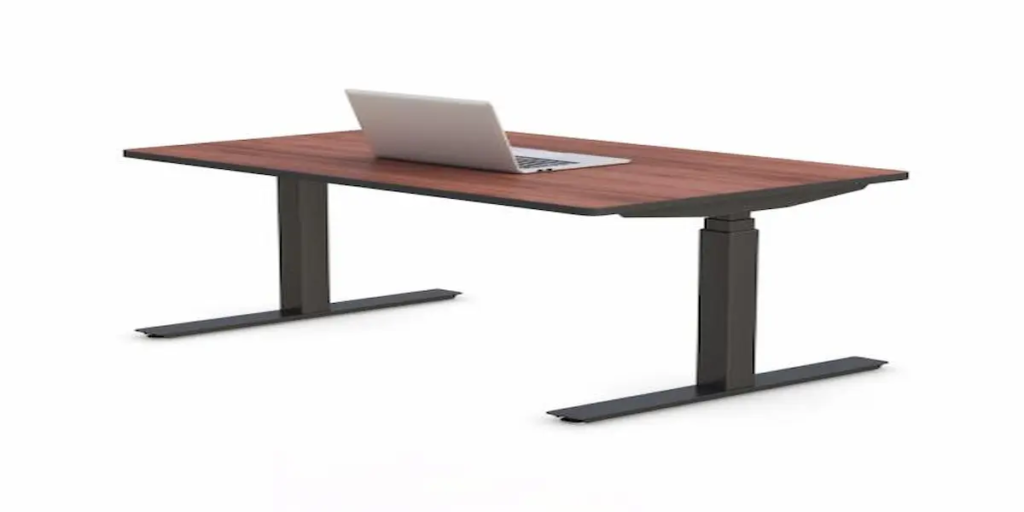
electric sit stand desk 48x30

Why Standing Desks Are Showing Up in 2026 Office Upgrade Budgets

Why Standing Desks Are Showing Up in 2026 Office Upgrade Budgets A lot of companies have shifted their approach to getting people back into the office. Instead of just handing down a mandate, they’re spending money on the office itself. Ergonomic stipends, furniture refreshes, and wellness upgrades keep showing up in coverage of 2026 return-to-office strategy. Standing desks are one of the most common line items in that spending. If you’re the one actually picking furniture for that budget, an electric sit-stand desk in the 48×30 size, like the one Ergoville builds, is worth a close look. It’s sized for the kind of single-monitor workstation most office roles actually use, and it’s built to order rather than pulled from a fixed catalog. What Should You Look for in an Electric Sit-Stand Desk for an Office Upgrade? A good electric sit-stand desk for an office refresh comes down to four things. A motor and lift mechanism that stays steady at full height. A warranty that actually covers repairs, not just replacement parts. Finish options that match the rest of the office. And a manufacturer who can build to order instead of forcing you into whatever size and color happen to be in stock. It’s easy to get pulled into comparing every spec sheet side by side. But the real question for an office upgrade is simpler. Will this desk hold up across dozens of daily uses without the lift getting wobbly. Can you order it in the finish that matches your space instead of settling. And if something goes wrong six months in, is there an actual warranty behind it, or just a return window that’s already closed. What Comes Standard on Ergoville’s 48×30 Model? This model comes with electronic push button height control, a laminated desktop with smooth edge moldings, hydraulic legs on a stable footing, and built-in wire management. CPU placement is handled too, so equipment stays out from underfoot. Weight capacity, lift range, and noise level at different heights aren’t listed on the current product page. Worth asking Ergoville directly for those numbers before finalizing a bulk order, especially if you’re comparing it against another vendor’s spec sheet. Four Things to Compare Before Ordering for an Office Refresh Desktop finish options matter more for an office refresh than a single desk purchase, since you’re trying to match a room, not just pick your own preference. Warranty terms are worth reading closely. Ask specifically what’s covered if a motor needs replacing down the line. Lead time for built-to-order desks tends to run longer than a DTC brand shipping from stock. Plan for that if you’re working toward a rollout date. Ask whether bulk or multi-unit ordering comes with any pricing or logistics advantage, since that’s not always advertised upfront. If you want the research behind why alternating between sitting and standing matters for long term health, SHRM has published guidance on ergonomic office design that’s worth a read before finalizing a company-wide policy. Is a 48×30 Electric Desk the Right Choice for Your Office Refresh? The 48×30 size works well for single-monitor workstations, shared desks, and offices upgrading in phases rather than replacing every desk with the biggest option available. If most of the roles in your office use one monitor and a laptop, 48×30 is probably plenty of room. It’s the size that tends to satisfy the most people without overspending on width nobody actually uses. That said, be honest about who might need more. Design roles running dual monitors, or teams that spread out paperwork alongside a screen, will likely outgrow 48 inches fast. It’s worth segmenting your order by role rather than picking one size for the whole floor. How Does 48×30 Compare to Ergoville’s Larger Desk Sizes? If you’re ordering across multiple departments, it helps to think in terms of what’s actually sitting on each desk. A 60×30 electric standing desk gives meaningfully more room for a dual monitor setup, while the 72×30 and 84×30 sizes make more sense for roles that need paperwork or extra equipment spread out. Mixing sizes across an office by role tends to work better than standardizing on one size for everyone. How Are Companies Actually Using Standing Desks in 2026 Office Upgrades? Companies are increasingly pairing standing desks with broader office refresh budgets and ergonomic stipend programs, as part of making in-office attendance feel worth it rather than mandatory. Picture a company rolling out new desks floor by floor as part of a phased office redesign, rather than all at once. Or an HR team offering an ergonomic stipend that employees can put toward furniture of their choosing, standing desks being one of the most common picks. Neither of these guarantees better morale or retention on its own. But they’re a real, current part of how companies are approaching the office right now, not just a marketing narrative built around the idea. What Do Facilities Teams Usually Ask Before Ordering Multiple Built-to-Spec Desks? Most ask about lead time for a multi-unit order, whether finish and color can be standardized across the batch, and what installation support looks like at scale. Since Ergoville builds to order, there’s more flexibility to answer these directly rather than working around a fixed catalog size. It’s worth checking out the custom desk configurations tool if you’re planning a larger rollout, or computer carts if some areas of the office need mobility more than a fixed desk. Frequently Asked Questions Is a 48×30 electric standing desk big enough for a typical office role? For most single-monitor workstations, yes. Roles running dual monitors or needing extra surface space may be better suited to a larger size. Can companies order multiple built-to-spec desks for an office upgrade at once? Yes, Ergoville builds to order, so bulk or multi-unit orders can be configured with consistent finish and specifications across the batch. What’s the weight capacity of an electric standing desk this size? Weight capacity should be confirmed directly with Ergoville before ordering, since it isn’t listed on

Why Standing Desks Are Showing Up in 2026 Office Upgrade Budgets Read More »

Why Cardiology Reading Desks Are Being Redesigned for the Future of Cardiac Imaging

Why Cardiology Reading Desks Are Being Redesigned for the Future of Cardiac Imaging Cardiovascular disease remains one of the most closely monitored health concerns worldwide, driving a growing demand for advanced cardiac imaging and faster diagnostic interpretation. As imaging volumes continue to rise, cardiologists are spending more time reviewing echocardiograms, cardiac CT scans, cardiac MRI studies, and nuclear cardiology exams. At the same time, healthcare organizations are embracing telecardiology, AI-assisted diagnostics, and hybrid work environments that allow specialists to review cases from multiple locations. These changes have elevated the importance of workstation design. A modern cardiology reading desk is no longer simply office furniture—it is a critical component of diagnostic efficiency, physician wellbeing, and workflow optimization. Today’s specialists need workstations that support multi-monitor environments, prolonged image review sessions, PACS access, and seamless integration with healthcare technologies. Organizations are increasingly investing in solutions such as office standing desks, ergonomic monitor arms, and customized workstation solutions through the desk configurator to support modern imaging teams. As cardiovascular imaging continues evolving, workstation design is becoming just as important as the technology used to generate the images themselves. Why Does Workstation Design Affect Cardiologist Performance? Cardiologists often spend hours reviewing complex diagnostic studies that require sustained concentration and precise interpretation. Whether analyzing echocardiography images, cardiac CT scans, or MRI studies, maintaining focus throughout long reading sessions is essential. Unfortunately, workstation limitations can create unnecessary obstacles that affect daily productivity. Common challenges include: Poor monitor positioning Neck and shoulder discomfort Workspace clutter Eye strain Limited ergonomic flexibility Workflow interruptions A properly designed cardiology reading desk helps address these challenges by supporting better posture, improving monitor accessibility, and creating a more organized workspace. When physicians can comfortably access imaging studies and supporting clinical information, they spend less time adjusting their environment and more time focusing on patient care. Healthcare organizations frequently improve workstation flexibility with ergonomic monitor arms and space-saving CPU holders that optimize equipment placement while maximizing usable desk space. The goal is not simply comfort—it is creating an environment that supports consistent performance throughout demanding workdays. How Are AI and Advanced Imaging Technologies Changing Reading Rooms? Artificial intelligence is rapidly becoming part of cardiovascular imaging workflows. AI-powered tools can assist with image analysis, workflow prioritization, anomaly detection, and data organization. At the same time, cardiologists increasingly rely on: PACS platforms Electronic Health Records (EHR) Imaging reporting systems Clinical communication tools Decision support software Advanced visualization applications This growing technology ecosystem requires workstation environments capable of supporting multiple applications simultaneously. A modern cardiology reading desk must provide enough flexibility to accommodate evolving technology while maintaining accessibility and organization. Healthcare facilities often supplement workstation environments with ergonomic accessories and adaptable wall mounts that support changing technology requirements. As AI-assisted imaging continues expanding, workstation infrastructure will play a larger role in helping physicians interact efficiently with increasingly sophisticated diagnostic tools. What Features Matter Most in a Cardiology Reading Desk? Not every workstation is designed for the demands of cardiovascular imaging. Specialists reviewing diagnostic studies often require features that go beyond standard office furniture. Several workstation characteristics consistently provide the greatest value. Height Adjustability Long reading sessions can contribute to physical discomfort and fatigue. Adjustable workstations allow physicians to alternate between sitting and standing positions throughout the day. Many healthcare organizations invest in office standing desks because they provide greater flexibility while supporting healthier work habits. Multi-Monitor Support Cardiology workflows frequently involve reviewing imaging studies alongside reports, patient records, and clinical data. A workstation should provide stable support for multiple displays without compromising visibility or workspace organization. Workspace Organization Efficient workspaces reduce distractions and improve workflow consistency. Proper cable management, monitor positioning, and equipment placement help maintain a clean and functional environment. Technology Integration Modern imaging environments often require support for computers, displays, peripherals, and future upgrades. Solutions such as CPU holders and ergonomic monitor arms help create flexible workstations that can adapt as technology evolves. Why Are Radiology Reading Stations Facing Similar Challenges? Although cardiology and radiology are distinct specialties, both rely heavily on technology-intensive diagnostic workflows. Radiologists and cardiologists often share common workstation requirements, including: Multi-monitor configurations Long periods of image review Diagnostic concentration PACS integration Ergonomic support Workflow efficiency A modern radiology reading station faces many of the same challenges encountered in cardiovascular imaging environments. Both specialties must manage growing imaging volumes while maintaining productivity and reducing fatigue. As a result, healthcare organizations frequently adopt workstation solutions that can support multiple specialties while allowing customization based on individual workflow needs. Ergonomic monitor arms and flexible office standing desks help create adaptable environments capable of supporting diverse diagnostic teams. Why Are Home and Hybrid Reading Environments Growing? Healthcare delivery models continue evolving, and specialists increasingly work across multiple locations. Many cardiologists now divide their time between: Hospitals Imaging centers Physician offices Home reading environments The growth of telecardiology and remote collaboration has increased demand for well-designed radiology home workstations and cardiovascular imaging workspaces. A productive home reading environment should support: Diagnostic-quality monitor configurations Secure system access Ergonomic comfort Reliable workflow continuity Long-term productivity Healthcare professionals increasingly recognize that remote work environments require the same ergonomic attention as traditional reading rooms. Many specialists use customized workstation solutions created through the desk configurator alongside ergonomic office standing desks to create highly functional home workspaces. As hybrid healthcare models become more common, workstation flexibility will remain a key consideration for healthcare organizations and physicians alike. How Can Healthcare Organizations Reduce Diagnostic Fatigue? Diagnostic fatigue is one of the most common concerns among imaging professionals. Long periods of image interpretation can contribute to: Eye strain Neck discomfort Shoulder tension Physical fatigue Reduced concentration While workstation design cannot eliminate every challenge associated with diagnostic work, it can significantly improve daily comfort and usability. Organizations focused on physician wellbeing often prioritize: Adjustable monitor positioning Flexible workstation layouts Organized workspaces Improved ergonomics Technology accessibility Solutions such as monitor arms, accessories, and customized workstation environments help create reading spaces that support long-term productivity. Reducing fatigue is not only about comfort—it also helps healthcare

Why Cardiology Reading Desks Are Being Redesigned for the Future of Cardiac Imaging Read More »