Monitor Stands

Why Industrial Computer Stands Are Becoming Critical Infrastructure for Industry 4.0

  Why Industrial Computer Stands Are Becoming Critical Infrastructure for Industry 4.0 Manufacturing facilities are evolving rapidly. As Industry 4.0 technologies, industrial automation, connected devices, and real-time production monitoring become standard across modern operations, organizations need infrastructure that supports faster decision-making and better access to information. Industrial computer systems are now at the center of production environments. Operators, engineers, quality control teams, and supervisors rely on digital dashboards, Manufacturing Execution Systems (MES), Human-Machine Interfaces (HMI), and industrial computer monitors to manage operations efficiently. However, even the most advanced technology can become ineffective if it is not positioned correctly. This is where an industrial computer stand becomes a critical component of modern manufacturing infrastructure. A properly designed stand floor mounted industrial computer stand provides stability, visibility, accessibility, and durability while supporting the operational requirements of demanding industrial environments. As manufacturers continue investing in smart factory initiatives, industrial workstation infrastructure is becoming just as important as the technology itself. Why Are Industrial Computer Stands Becoming More Important? The industrial workplace has changed dramatically over the last decade. Today’s production environments depend heavily on: Real-time monitoring Digital work instructions Production dashboards Automated systems Industrial software platforms Connected equipment Employees need immediate access to information without disrupting workflows. An industrial computer stand provides a stable and accessible platform for industrial computer monitors and workstations, allowing operators to interact with systems efficiently while remaining focused on production tasks. Instead of placing equipment on temporary surfaces or workbenches, organizations can create dedicated workstation locations that improve both productivity and safety. Facilities looking to standardize workstation deployment often combine industrial infrastructure with solutions such as floor post stands to create organized and durable production environments. How Do Industrial Computer Stands Improve Manufacturing Efficiency? Access to information plays a major role in manufacturing performance. Production delays often occur when operators must leave their work area to retrieve information, check system status, or access production data. An industrial computer stand helps eliminate these inefficiencies by positioning industrial computer monitors directly where information is needed. Benefits include: Improved production visibility Faster access to operational data Reduced operator movement Better workflow continuity Increased productivity Improved response times When operators can view critical information without leaving their workstation, decision-making becomes faster and more accurate. This is especially important in environments where production data changes constantly throughout the day. Organizations frequently enhance visibility using ergonomic monitor arms that allow displays to be positioned for optimal viewing angles. Why Is Visibility So Important on the Production Floor? Manufacturing environments rely on real-time information. Operators may need immediate access to: Production metrics Quality control data Machine status reports Inventory systems Safety notifications Process instructions Poor monitor placement can create unnecessary challenges. Employees may need to walk to another location, adjust equipment repeatedly, or struggle to view important information clearly. A properly positioned industrial computer monitor supported by a floor-mounted stand helps ensure information remains visible, accessible, and easy to use. Improved visibility contributes to: Faster decision-making Reduced errors Better operational awareness Increased productivity These improvements support both workforce efficiency and overall production performance. How Are Smart Factories Changing Workstation Requirements? Industry 4.0 initiatives continue transforming manufacturing operations worldwide. Modern facilities increasingly rely on: Connected machinery Industrial Internet of Things (IIoT) Automation platforms Data analytics Cloud-based monitoring systems Digital production workflows As technology adoption increases, workstation infrastructure must evolve as well. Traditional workstation layouts may struggle to support modern production requirements. A stand floor mounted industrial computer stand provides a flexible and durable foundation for digital manufacturing environments. Rather than treating workstation placement as an afterthought, organizations are now incorporating workstation infrastructure into broader smart factory planning initiatives. Solutions such as track mounts and wall mounts are often used alongside industrial computer stands to create highly adaptable production environments. What Features Matter Most in an Industrial Computer Stand? Selecting the right workstation infrastructure requires evaluating several key factors. Heavy-Duty Construction Industrial environments can be demanding. A quality industrial computer stand should provide: Structural stability Long-term durability Resistance to workplace wear Reliable equipment support Floor-Mounted Stability Floor-mounted systems help minimize movement and vibration while supporting larger monitor configurations. Equipment Accessibility Operators should be able to interact with equipment quickly and comfortably. Monitor Flexibility Proper positioning improves visibility and workflow efficiency. Long-Term Reliability Industrial workstation infrastructure should support years of continuous operation. Organizations often combine industrial stands with supporting accessories and ergonomic CPU holders to create organized and scalable workstation environments. Why Does Ergonomics Matter in Industrial Environments? Ergonomics is often associated with office work, but it is equally important in industrial settings. Employees regularly interact with: Computer monitors Touchscreen systems Industrial software Data dashboards Equipment controls Poor monitor placement can create unnecessary strain while reducing usability. Proper workstation design helps improve: User comfort Monitor visibility Productivity Workflow efficiency Employee satisfaction Industrial computer stands support ergonomic workstation positioning by allowing equipment to be placed where it is most accessible. When combined with adjustable monitor solutions, organizations can further improve user experiences while supporting long-term operational performance. Which Industries Benefit Most From Industrial Computer Stands? Although manufacturing is the most common application, industrial computer stands provide value across numerous environments. Manufacturing Facilities Support production monitoring, quality control, and operational visibility. Warehouses and Distribution Centers Provide access to inventory systems, logistics platforms, and warehouse management software. Industrial Processing Plants Support monitoring of production systems and operational processes. Laboratories Provide secure workstation support for testing and analysis systems. Quality Assurance Departments Improve visibility and accessibility for inspection and reporting activities. The versatility of industrial workstation infrastructure makes it valuable wherever digital systems support operational decision-making. What Mistakes Should Buyers Avoid? Choosing the wrong workstation infrastructure can create unnecessary costs and operational challenges. Common mistakes include: Focusing Only on Initial Cost Lower-cost solutions may lack durability or long-term reliability. Ignoring Environmental Conditions Industrial environments often require more robust workstation support systems. Overlooking User Accessibility Workstations should be designed around employee workflows. Neglecting Future Expansion Technology requirements frequently evolve over time. Organizations should choose infrastructure capable of adapting to future operational needs.

Why Industrial Computer Stands Are Becoming Critical Infrastructure for Industry 4.0 Read More »
Why Industrial Computer Stands Are Becoming Critical to Industry 4.0 Workflows in 2026

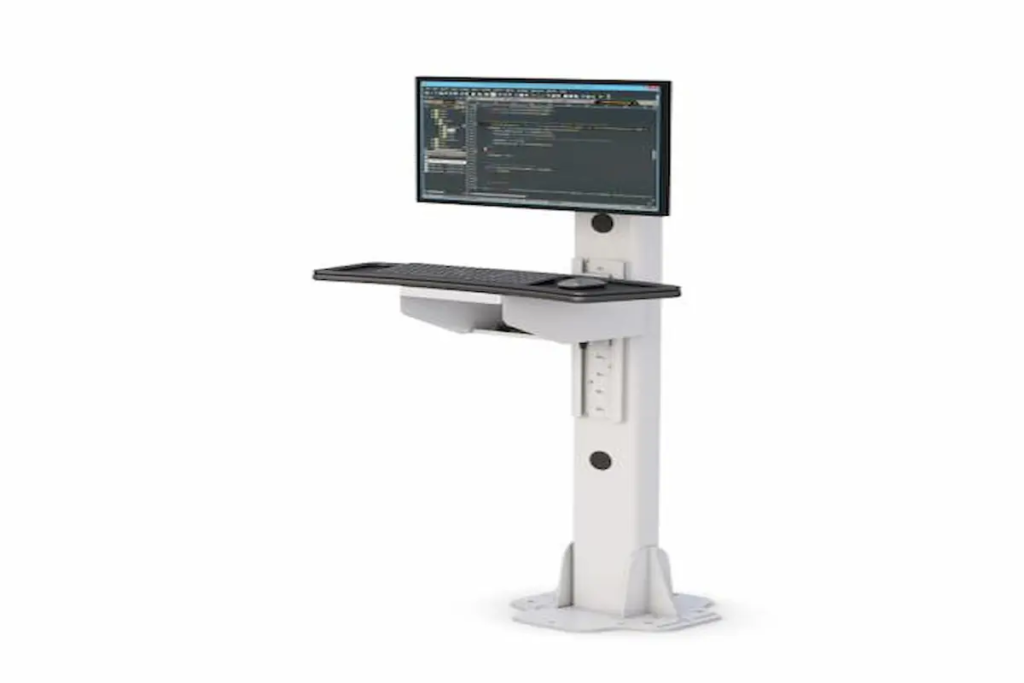
Why Industrial Computer Stands Are Becoming Critical to Industry 4.0 Workflows in 2026   Manufacturing is entering a new phase of digital transformation. As Industry 4.0 initiatives continue accelerating across factories, warehouses, distribution centers, and production facilities, organizations are increasingly investing in technologies that improve efficiency, visibility, and workforce productivity. Today’s smart factories rely heavily on real-time production data, Human Machine Interface (HMI) systems, industrial computer monitors, manufacturing execution systems (MES), and connected automation platforms. However, even the most advanced digital systems can become inefficient if employees cannot easily access the information they need. This is where industrial computer stands have become increasingly important. A properly designed industrial computer stand helps operators access critical data, improve workstation ergonomics, and maintain workflow efficiency throughout industrial environments. Organizations implementing Industry 4.0 strategies are increasingly adopting solutions like Ergoville’s floor post stands, computer racks, and customized workstation configurations through the desk configurator to support smarter and more connected workplaces. As manufacturing technology continues evolving, workstation accessibility is becoming just as important as the technology itself. How Do Industrial Computer Monitors Support Smart Factory Operations? Modern factories generate enormous amounts of operational data. Production metrics, quality control information, maintenance alerts, machine diagnostics, and workflow instructions must be available to employees in real time. Industrial computer monitors serve as the primary interface between workers and these digital systems. Whether operators are monitoring production equipment, reviewing quality control data, or accessing work instructions, monitor visibility and accessibility directly affect operational performance. An effective industrial computer stand ensures that critical information is always positioned where employees can easily see and interact with it. Benefits include: Faster decision-making Improved workflow efficiency Reduced production delays Better visibility of operational data Enhanced communication between teams As factories become more connected, industrial computer monitors are no longer optional tools—they are becoming essential components of daily operations. Many organizations enhance these systems further through ergonomic monitor arms that improve monitor positioning and workstation flexibility throughout industrial environments. Why Is Workstation Accessibility Becoming More Important? Technology investments alone do not automatically improve productivity. Employees must be able to access and use those technologies efficiently. Poorly positioned monitors can create numerous workplace challenges: Operators walking unnecessarily between stations Reduced visibility of production information Delayed response times Increased physical strain Workflow interruptions Industrial facilities increasingly recognize that workstation accessibility directly influences operational efficiency. A properly mounted monitor allows workers to interact with production data without leaving their designated work areas. This reduces unnecessary movement while helping maintain focus on critical operational tasks. Solutions such as Ergoville’s floor post stands help organizations position technology where it delivers the greatest operational value. Accessibility is particularly important in: Manufacturing facilities Warehouses Distribution centers Assembly lines Industrial laboratories Quality control stations As industrial environments continue becoming more data-driven, workstation accessibility will remain a key component of digital transformation success. How Are Industrial Workstations Supporting Digital Manufacturing? Digital manufacturing depends on continuous access to information. Employees increasingly rely on industrial computer systems to interact with: Manufacturing Execution Systems (MES) Human Machine Interface (HMI) platforms Production scheduling systems Inventory management software Quality assurance applications Predictive maintenance platforms Industrial workstations act as the bridge between employees and digital operations. Without properly configured workstations, organizations may struggle to fully realize the benefits of Industry 4.0 initiatives. Industrial computer stands help create organized environments that support digital workflows while improving equipment accessibility and operational efficiency. Many manufacturers combine industrial monitor solutions with computer racks and track mounts to create comprehensive workstation ecosystems that support evolving operational requirements. As manufacturing technology becomes more sophisticated, workstation infrastructure must evolve alongside it. What Features Matter Most in Industrial Computer Stands? Industrial buyers often focus heavily on monitor specifications and software capabilities. However, the stand supporting those technologies can have a significant impact on productivity and usability. When evaluating industrial computer stands, several features deserve careful consideration. Durability Industrial environments require equipment capable of withstanding demanding conditions. Heavy-duty construction helps ensure long-term reliability. Adjustability Workers vary in height, responsibilities, and workflow requirements. Adjustable monitor positioning helps improve accessibility for different users. Cable Management Proper cable routing creates safer and more organized work environments while reducing maintenance concerns. Equipment Protection Industrial computer stands should help protect valuable hardware while supporting easy access for maintenance and upgrades. Flexibility As operational needs change, workstation systems should adapt without requiring complete replacement. Organizations frequently integrate solutions such as CPU holders and specialized accessories to further enhance workstation functionality. Why Does Ergonomics Matter in Industrial Environments? Industrial workers often spend long hours interacting with computer systems throughout production shifts. Poor monitor placement can contribute to: Neck strain Shoulder discomfort Eye fatigue Reduced productivity Increased employee frustration While ergonomics is commonly associated with office environments, it plays an equally important role in industrial workplaces. Proper monitor positioning allows employees to work more comfortably while maintaining visibility of critical production information. Modern industrial workstation design focuses on improving both efficiency and employee wellbeing. Solutions such as monitor arms provide additional flexibility by allowing operators to adjust monitors based on individual preferences and workflow requirements. Organizations investing in ergonomic improvements often see benefits that extend beyond comfort, including improved productivity and employee satisfaction. What Mistakes Should Companies Avoid? Selecting industrial workstation solutions without fully evaluating operational needs can create long-term challenges. Common mistakes include: Prioritizing Price Over Functionality The least expensive solution may not provide the durability or flexibility required for industrial environments. Ignoring Future Expansion Industry 4.0 initiatives continue evolving. Organizations should choose workstation systems capable of supporting future growth. Overlooking Ergonomics Poor monitor placement can negatively affect productivity and employee wellbeing. Failing to Consider Workflow Requirements Different industrial environments require different workstation configurations. Manufacturing facilities, warehouses, laboratories, and distribution centers often have unique operational needs that should influence equipment selection. Organizations planning long-term workstation strategies frequently use Ergoville’s desk configurator to design customized solutions that align with operational goals. How Do You Choose the Right Industrial Computer Stand? Choosing the right solution begins with understanding how employees interact with technology throughout daily operations.

Why Industrial Computer Stands Are Becoming Critical to Industry 4.0 Workflows in 2026 Read More »

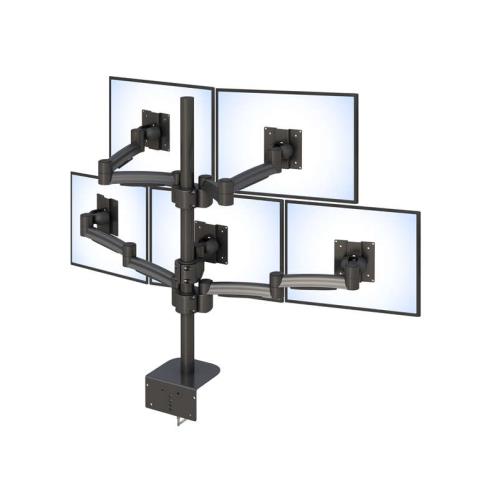
Ergoville's Five Arm LCD Monitor Stand enhances workspace ergonomics with adjustable arms for multiple screen setups.

5 Monitor Stand: The Ultimate Setup for Maximum Productivity

5 Monitor Stand: The Ultimate Setup for Maximum Productivity   If you constantly switch between tabs, juggle multiple applications, or struggle to keep everything visible at once, your current setup may be limiting your productivity. For professionals handling complex workflows—trading, design, IT monitoring, or data analysis—one or two screens simply aren’t enough. A 5 monitor stand transforms how you work. Instead of managing cluttered desks or misaligned screens, it creates a centralized, ergonomic setup that keeps everything within view. The result is a cleaner workspace, faster decision-making, and a more efficient workflow. If you’re considering upgrading your workstation, understanding how a multi-monitor setup works—and whether it’s right for you—can make all the difference. What Is a 5 Monitor Stand and Why Do Professionals Use It? A 5 monitor stand is a mounting system designed to securely hold and organize five screens in a single, ergonomic structure. Instead of placing monitors separately across a desk, this solution aligns them into a cohesive layout. This not only saves space but also improves visibility and reduces the need for constant head and body movement. Professionals rely on this setup to monitor multiple data streams simultaneously, making it easier to stay focused and responsive. For advanced setups, solutions like this five arm LCD monitor stand provide both stability and flexibility in demanding work environments. What Are the Benefits of Using a 5 Monitor Stand? How Does It Improve Productivity and Workflow? A 5 monitor stand improves productivity by allowing you to view and manage multiple tasks simultaneously without switching screens. When all your applications are visible at once, you reduce the time spent navigating between windows. This leads to faster decision-making and smoother workflows. Whether you’re analyzing data or managing operations, having everything in front of you improves efficiency significantly. For businesses aiming to optimize performance, integrating multi-monitor setups alongside solutions like monitor arms can further enhance flexibility. Does It Help Save Desk Space and Reduce Clutter? Yes, it consolidates multiple monitors into one structured system, freeing up desk space. Without a proper stand, multiple monitors can quickly take over your workspace. A dedicated mounting system organizes everything vertically and horizontally, creating a cleaner and more professional setup. This not only improves aesthetics but also makes your workspace easier to manage. A well-organized desk contributes directly to better focus and reduced stress during work. Is a 5 Monitor Setup Ergonomic? Yes, when properly configured, it supports better posture and reduces strain. By positioning monitors at the correct height and angle, a multi-monitor stand minimizes neck and eye strain. Instead of constantly adjusting your posture, you maintain a more natural and comfortable position throughout the day. Combining this setup with ergonomic solutions like a standing desk can further improve long-term comfort and health. How Do You Choose the Right 5 Monitor Stand? What Features Should You Look For? Key features include stability, adjustability, compatibility, and weight capacity. A reliable stand should securely hold all monitors without wobbling while allowing adjustments for height and angle. Compatibility with your monitor sizes and mounting standards is also essential. These factors ensure that your setup remains both functional and safe. If you’re comparing options, exploring the Ergoville homepage can help you identify the best solutions available. What Layout Options Are Available? Common layouts include horizontal arrays, stacked configurations, and hybrid designs. The best layout depends on how you use your screens. Horizontal setups are ideal for continuous workflows, while stacked configurations help maximize vertical space. Hybrid layouts offer a balance of both, providing flexibility for complex tasks. Choosing the right layout ensures that your setup supports your workflow instead of complicating it. Who Should Invest in a 5 Monitor Stand? Professionals handling complex, multi-task workflows benefit the most from this setup. This includes traders, developers, security monitoring teams, and operations managers. If your work involves tracking multiple data sources or applications simultaneously, a multi-monitor system can significantly improve efficiency and accuracy. For tailored recommendations, you can reach out through the Ergoville contact page to find the best configuration for your needs. What Does a 5 Monitor Setup Look Like in Real Use? What Are Common Real-World Applications? Common applications include trading desks, IT monitoring stations, control rooms, and design studios. In trading environments, multiple screens display live market data. In IT operations, they monitor systems and alerts in real time. Designers use them to manage tools, previews, and workflows simultaneously. These setups allow professionals to stay informed and responsive at all times. Seeing how these systems are used in real scenarios makes it easier to understand their value. What Problems Can It Solve Immediately? A 5 monitor stand solves issues like screen clutter, inefficient multitasking, and limited visibility. If your current setup requires constant switching between tabs or screens, upgrading to a multi-monitor system eliminates that friction. It creates a more fluid workflow, reduces errors, and helps you stay focused on critical tasks. The result is a more productive and less stressful work environment. Frequently Asked Questions What is a 5 monitor stand? It is a mounting system designed to hold and organize five monitors in one ergonomic setup. Is a 5 monitor setup worth it? Yes, especially for professionals who manage multiple tasks or data streams simultaneously. Do I need a large desk for a 5 monitor stand? Not necessarily, as the stand helps optimize and reduce desk space usage. Can I adjust each monitor individually? Yes, most high-quality stands allow individual adjustments for optimal positioning.

5 Monitor Stand: The Ultimate Setup for Maximum Productivity Read More »