
Why Today’s Radiologist Workstation Needs More Than Just Multiple Monitors
Medical imaging continues to evolve at an extraordinary pace. Radiologists are interpreting more studies than ever before, while healthcare organizations are working to improve efficiency, reduce burnout, and support remote reading environments. In this landscape, the radiologist workstation has become much more than a desk with several monitors.
A modern radiologist workstation serves as the center of diagnostic decision-making. Whether used in a hospital reading room, imaging center, academic medical facility, or home office, the workstation directly affects comfort, workflow efficiency, and daily productivity. As technologies such as PACS, AI-assisted image analysis, and teleradiology continue to expand, workstation design is becoming a critical investment rather than an afterthought.
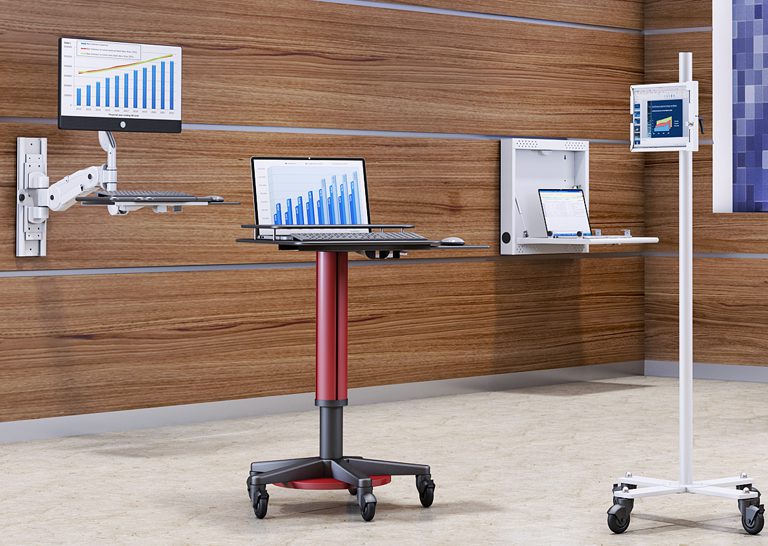
Solutions like the Ergoville Radiology Reading Workstation Standing Desk are designed specifically to support the unique demands of diagnostic imaging professionals by combining ergonomic flexibility, multi-monitor support, and workspace organization into a single workstation environment.
Why Does a Radiologist Workstation Matter More Than Ever?
The role of the radiologist has changed significantly over the past decade. Imaging volumes continue to increase, while healthcare systems expect faster turnaround times and greater diagnostic efficiency.
A radiologist may spend eight to twelve hours per day reviewing CT scans, MRIs, mammograms, X-rays, ultrasound studies, and other diagnostic images. During that time, the workstation becomes one of the most frequently used tools in the entire workflow.
An effective radiologist workstation supports:
- Diagnostic efficiency
- Reading comfort
- Workflow organization
- Multi-monitor viewing
- PACS accessibility
- Long-term ergonomic health
Organizations investing in professional imaging environments often combine dedicated radiology workstations with ergonomic solutions such as office standing desks and adjustable monitor arms to create healthier workspaces for clinicians.
As healthcare facilities continue expanding remote reading capabilities, workstation quality is becoming increasingly important for both on-site and off-site radiologists.
What Features Define a Modern Radiology Reading Station?
Ergonomics Is No Longer Optional
Many radiologists spend the majority of their workday seated in front of multiple displays. Over time, poor workstation design can contribute to:
- Neck strain
- Shoulder discomfort
- Eye fatigue
- Lower back pain
- Reduced concentration
A modern radiology reading station should support comfortable posture throughout long reading sessions. Height-adjustable workstations allow radiologists to alternate between sitting and standing positions, helping reduce physical fatigue during extended workdays.
Adjustability also supports individual user preferences, which is particularly valuable in shared reading environments where multiple radiologists use the same workstation throughout the day.
Organizations frequently enhance ergonomic performance through integrated accessories and adjustable monitor arms that improve monitor positioning and viewing comfort.
Multi-Monitor Support Improves Workflow
Modern imaging workflows often require multiple displays operating simultaneously.
Radiologists commonly use separate monitors for:
- Diagnostic imaging
- PACS systems
- Reporting software
- Electronic health records
- Communication platforms
Managing these applications efficiently requires a workstation specifically designed for multi-monitor configurations.
Proper monitor positioning helps improve visibility while reducing unnecessary head and neck movement. Equipment organization also becomes easier when workstations incorporate dedicated cable management and technology support systems such as CPU holders.
The result is a cleaner and more efficient reading environment that supports uninterrupted diagnostic workflows.
How Can Workstation Design Improve Reading Efficiency?
Reducing Distractions During Image Interpretation
Radiologists rely heavily on concentration and visual focus. Even minor workstation frustrations can disrupt workflow and reduce efficiency throughout the day.
A well-designed radiologist workstation helps minimize distractions by providing:
- Organized workspace layouts
- Easy equipment access
- Comfortable viewing angles
- Efficient technology integration
- Reduced clutter
When workstations are designed around actual reading workflows, radiologists can focus more attention on image interpretation and less on adjusting equipment or managing workspace limitations.
Many imaging departments use the desk configurator to develop custom workstation solutions tailored to their specific reading environments.
Supporting Long Reading Sessions
Unlike many office-based roles, radiologists frequently spend extended periods analyzing complex studies that require sustained concentration.
Workstation design can influence:
- User comfort
- Workflow consistency
- Reading endurance
- Task efficiency
While workstation design cannot eliminate the demands of diagnostic work, it can help create a more supportive environment that reduces unnecessary physical strain.
For organizations evaluating reading room upgrades, workstation ergonomics often become one of the highest-return investments available.
Why Are Radiology Home Workstations Becoming More Common?
The growth of teleradiology and hybrid healthcare work models has changed how many radiologists practice.
Remote reading environments now support:
- Overnight coverage
- Specialty consultations
- Flexible scheduling
- Expanded healthcare access
- Multi-site healthcare networks
As a result, the radiology home workstation has become increasingly important.
A professional home workstation should provide many of the same advantages found in hospital-based reading rooms, including:
- Multi-monitor support
- Ergonomic adjustability
- Technology organization
- Reliable equipment placement
- Comfortable working conditions
Radiologists working remotely often combine ergonomic office standing desks with customizable workstation solutions developed through the desk configurator.
Creating a dedicated reading environment helps support productivity while maintaining professional imaging workflows outside traditional healthcare facilities.
How Are Cardiology Reading Desks Similar to Radiology Workstations?
Although radiology and cardiology involve different imaging specialties, their workstation requirements share many similarities.
Cardiology reading desks often support:
- Echocardiography review
- Cardiac CT interpretation
- Cardiac MRI analysis
- Reporting workflows
- Multi-monitor viewing
Like radiologists, cardiologists frequently spend extended periods reviewing imaging studies that require detailed analysis and sustained concentration.
As a result, many workstation features overlap, including:
- Height adjustability
- Multi-monitor support
- Ergonomic positioning
- Workspace organization
- Technology integration
Healthcare organizations often standardize workstation design across multiple imaging specialties to create consistent user experiences and simplify workstation management.
How Do You Choose the Right Radiologist Workstation?
Selecting a workstation requires evaluating both current and future workflow needs.
Important considerations include:
Reading Volume
Higher imaging volumes often require more advanced workstation configurations.
Monitor Requirements
Determine the number and size of displays needed to support diagnostic workflows.
Workspace Dimensions
Available space influences workstation layout and equipment placement.
Ergonomic Needs
Adjustability is critical for supporting long-term user comfort.
Future Scalability
Workstations should accommodate evolving technology and workflow demands.
Many healthcare facilities also integrate supporting infrastructure such as computer racks and specialized accessories to support broader imaging department requirements.
By evaluating these factors carefully, organizations can invest in workstation solutions that remain valuable for years to come.
Frequently Asked Questions
What is a radiologist workstation?
A radiologist workstation is a specialized workstation designed to support diagnostic imaging workflows, PACS access, multi-monitor viewing, and image interpretation tasks.
What is a radiology reading station?
A radiology reading station is the physical workspace where radiologists review and interpret medical imaging studies using diagnostic monitors and software systems.
How many monitors does a radiologist workstation typically use?
Most radiologist workstations use between two and six monitors depending on specialty requirements and workflow preferences.
What is a radiology home workstation?
A radiology home workstation is a professional imaging workstation designed for remote image interpretation and teleradiology workflows.
Are cardiology reading desks different from radiology workstations?
They share many similarities, including multi-monitor support, ergonomic design, and imaging-focused workflows, although specific software and display requirements may differ.
What features should a radiologist workstation have?
Important features include ergonomic adjustability, multi-monitor support, workspace organization, technology integration, and scalability for future needs.
Why Today’s Radiologist Workstation Needs More Than Just Multiple Monitors
Medical imaging continues to evolve at an extraordinary pace. Radiologists are interpreting more studies than ever before, while healthcare organizations are working to improve efficiency, reduce burnout, and support remote reading environments. In this landscape, the radiologist workstation has become much more than a desk with several monitors.
A modern radiologist workstation serves as the center of diagnostic decision-making. Whether used in a hospital reading room, imaging center, academic medical facility, or home office, the workstation directly affects comfort, workflow efficiency, and daily productivity. As technologies such as PACS, AI-assisted image analysis, and teleradiology continue to expand, workstation design is becoming a critical investment rather than an afterthought.
Solutions like the Ergoville Radiology Reading Workstation Standing Desk are designed specifically to support the unique demands of diagnostic imaging professionals by combining ergonomic flexibility, multi-monitor support, and workspace organization into a single workstation environment.
Why Does a Radiologist Workstation Matter More Than Ever?
The role of the radiologist has changed significantly over the past decade. Imaging volumes continue to increase, while healthcare systems expect faster turnaround times and greater diagnostic efficiency.
A radiologist may spend eight to twelve hours per day reviewing CT scans, MRIs, mammograms, X-rays, ultrasound studies, and other diagnostic images. During that time, the workstation becomes one of the most frequently used tools in the entire workflow.
An effective radiologist workstation supports:
- Diagnostic efficiency
- Reading comfort
- Workflow organization
- Multi-monitor viewing
- PACS accessibility
- Long-term ergonomic health
Organizations investing in professional imaging environments often combine dedicated radiology workstations with ergonomic solutions such as office standing desks and adjustable monitor arms to create healthier workspaces for clinicians.
As healthcare facilities continue expanding remote reading capabilities, workstation quality is becoming increasingly important for both on-site and off-site radiologists.
What Features Define a Modern Radiology Reading Station?
Ergonomics Is No Longer Optional
Many radiologists spend the majority of their workday seated in front of multiple displays. Over time, poor workstation design can contribute to:
- Neck strain
- Shoulder discomfort
- Eye fatigue
- Lower back pain
- Reduced concentration
A modern radiology reading station should support comfortable posture throughout long reading sessions. Height-adjustable workstations allow radiologists to alternate between sitting and standing positions, helping reduce physical fatigue during extended workdays.
Adjustability also supports individual user preferences, which is particularly valuable in shared reading environments where multiple radiologists use the same workstation throughout the day.
Organizations frequently enhance ergonomic performance through integrated accessories and adjustable monitor arms that improve monitor positioning and viewing comfort.
Multi-Monitor Support Improves Workflow
Modern imaging workflows often require multiple displays operating simultaneously.
Radiologists commonly use separate monitors for:
- Diagnostic imaging
- PACS systems
- Reporting software
- Electronic health records
- Communication platforms
Managing these applications efficiently requires a workstation specifically designed for multi-monitor configurations.
Proper monitor positioning helps improve visibility while reducing unnecessary head and neck movement. Equipment organization also becomes easier when workstations incorporate dedicated cable management and technology support systems such as CPU holders.
The result is a cleaner and more efficient reading environment that supports uninterrupted diagnostic workflows.
How Can Workstation Design Improve Reading Efficiency?
Reducing Distractions During Image Interpretation
Radiologists rely heavily on concentration and visual focus. Even minor workstation frustrations can disrupt workflow and reduce efficiency throughout the day.
A well-designed radiologist workstation helps minimize distractions by providing:
- Organized workspace layouts
- Easy equipment access
- Comfortable viewing angles
- Efficient technology integration
- Reduced clutter
When workstations are designed around actual reading workflows, radiologists can focus more attention on image interpretation and less on adjusting equipment or managing workspace limitations.
Many imaging departments use the desk configurator to develop custom workstation solutions tailored to their specific reading environments.
Supporting Long Reading Sessions
Unlike many office-based roles, radiologists frequently spend extended periods analyzing complex studies that require sustained concentration.
Workstation design can influence:
- User comfort
- Workflow consistency
- Reading endurance
- Task efficiency
While workstation design cannot eliminate the demands of diagnostic work, it can help create a more supportive environment that reduces unnecessary physical strain.
For organizations evaluating reading room upgrades, workstation ergonomics often become one of the highest-return investments available.
Why Are Radiology Home Workstations Becoming More Common?
The growth of teleradiology and hybrid healthcare work models has changed how many radiologists practice.
Remote reading environments now support:
- Overnight coverage
- Specialty consultations
- Flexible scheduling
- Expanded healthcare access
- Multi-site healthcare networks
As a result, the radiology home workstation has become increasingly important.
A professional home workstation should provide many of the same advantages found in hospital-based reading rooms, including:
- Multi-monitor support
- Ergonomic adjustability
- Technology organization
- Reliable equipment placement
- Comfortable working conditions
Radiologists working remotely often combine ergonomic office standing desks with customizable workstation solutions developed through the desk configurator.
Creating a dedicated reading environment helps support productivity while maintaining professional imaging workflows outside traditional healthcare facilities.
How Are Cardiology Reading Desks Similar to Radiology Workstations?
Although radiology and cardiology involve different imaging specialties, their workstation requirements share many similarities.
Cardiology reading desks often support:
- Echocardiography review
- Cardiac CT interpretation
- Cardiac MRI analysis
- Reporting workflows
- Multi-monitor viewing
Like radiologists, cardiologists frequently spend extended periods reviewing imaging studies that require detailed analysis and sustained concentration.
As a result, many workstation features overlap, including:
- Height adjustability
- Multi-monitor support
- Ergonomic positioning
- Workspace organization
- Technology integration
Healthcare organizations often standardize workstation design across multiple imaging specialties to create consistent user experiences and simplify workstation management.
How Do You Choose the Right Radiologist Workstation?
Selecting a workstation requires evaluating both current and future workflow needs.
Important considerations include:
Reading Volume
Higher imaging volumes often require more advanced workstation configurations.
Monitor Requirements
Determine the number and size of displays needed to support diagnostic workflows.
Workspace Dimensions
Available space influences workstation layout and equipment placement.
Ergonomic Needs
Adjustability is critical for supporting long-term user comfort.
Future Scalability
Workstations should accommodate evolving technology and workflow demands.
Many healthcare facilities also integrate supporting infrastructure such as computer racks and specialized accessories to support broader imaging department requirements.
By evaluating these factors carefully, organizations can invest in workstation solutions that remain valuable for years to come.
Frequently Asked Questions
What is a radiologist workstation?
A radiologist workstation is a specialized workstation designed to support diagnostic imaging workflows, PACS access, multi-monitor viewing, and image interpretation tasks.
What is a radiology reading station?
A radiology reading station is the physical workspace where radiologists review and interpret medical imaging studies using diagnostic monitors and software systems.
How many monitors does a radiologist workstation typically use?
Most radiologist workstations use between two and six monitors depending on specialty requirements and workflow preferences.
What is a radiology home workstation?
A radiology home workstation is a professional imaging workstation designed for remote image interpretation and teleradiology workflows.
Are cardiology reading desks different from radiology workstations?
They share many similarities, including multi-monitor support, ergonomic design, and imaging-focused workflows, although specific software and display requirements may differ.
What features should a radiologist workstation have?
Important features include ergonomic adjustability, multi-monitor support, workspace organization, technology integration, and scalability for future needs.