
Wall Mounted Computer: Save Space & Improve Workflow
Introduction: Is Your Workspace Holding You Back?
A cluttered desk doesn’t just look unprofessional—it slows you down, limits movement, and can even impact your posture. Whether you’re managing a busy office, running a healthcare facility, or working from home, space and efficiency matter more than ever.
A wall mounted computer offers a smarter way to work. By moving your workstation off the desk and onto the wall, you instantly create a cleaner, more ergonomic, and more productive environment. If you’re exploring ways to upgrade your setup, this guide will help you understand exactly how and why this solution works—and whether it’s the right fit for you.
What Is a Wall Mounted Computer and Why Are People Switching to It?
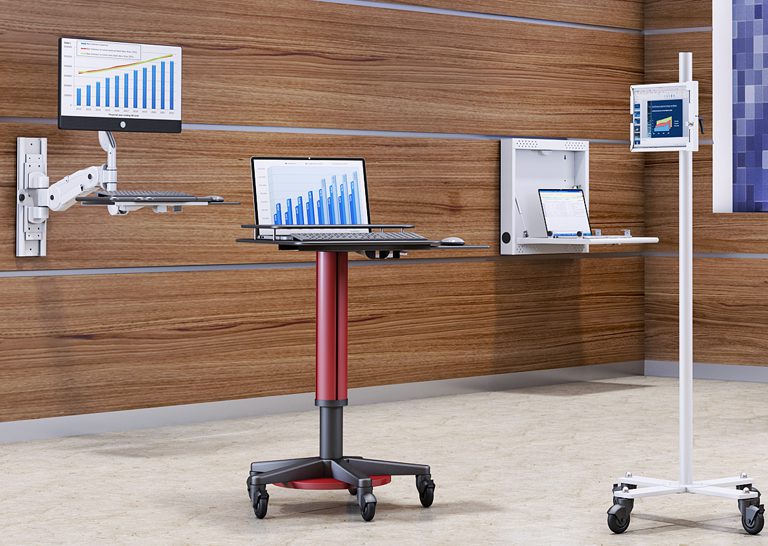
A wall mounted computer is a workstation setup that is securely attached to a wall, designed to save space and improve ergonomics.
Unlike traditional desk setups, wall-mounted systems elevate your monitor, CPU, and accessories into a compact, organized structure. This shift is becoming increasingly popular in modern workspaces where efficiency and flexibility are essential. Businesses and individuals are moving toward these solutions to eliminate clutter, improve posture, and create a more streamlined workflow.
If your current setup feels cramped or inefficient, switching to a wall-mounted system can transform how you work—without requiring a complete office overhaul.
What Are the Best Ways to Use a Wall Mounted Computer Setup?
How Can Wall Mounted Computers Improve Office Productivity?
Wall mounted computers improve productivity by freeing up desk space and creating a more organized workflow.
When your workspace is clear, your focus improves. With fewer distractions and better access to your tools, tasks become easier to manage. Employees can move more freely, collaborate more efficiently, and maintain better posture throughout the day. Over time, these small improvements can significantly impact overall performance.
For offices looking to optimize efficiency, integrating solutions like wall mount systems (https://ergoville.com/wall-mounts/) or pairing them with monitor arms (https://ergoville.com/monitor-arms/) can create a flexible and scalable setup.
Are Wall Mounted Computers Good for Healthcare or Industrial Settings?
Yes, wall mounted computers are ideal for healthcare and industrial environments because they improve hygiene, accessibility, and space efficiency.
In healthcare settings, reducing surface contact is critical. Wall-mounted systems help minimize contamination risks by keeping equipment off shared surfaces. In industrial environments, they provide durable, space-saving access to systems without interfering with workflow or safety.
These setups are especially valuable in high-traffic areas where every inch of space matters and quick access to systems is essential.
Can a Wall Mounted Computer Work in a Home Office?
Yes, wall mounted computers are perfect for home offices, especially in smaller spaces.
Remote work has made space optimization a priority. A wall-mounted setup allows you to create a clean, minimalist workspace—even in tight areas. It also helps separate your work environment from your personal space, improving focus and productivity.
If you’re working with limited room, combining a wall mount with a standing desk (https://ergoville.com/office-standing-desk/) can create a highly functional and ergonomic home office.
How Do You Choose the Right Wall Mounted Computer Setup?
What Factors Should You Consider Before Buying?
Key factors include available space, adjustability, weight capacity, and your daily workflow needs.
Before choosing a system, think about how you work. Do you need flexibility for different users? Will the setup support multiple devices? Is space your main concern, or are you focused on ergonomics?
Answering these questions helps narrow down your options and ensures you invest in a solution that actually improves your workflow—not complicates it.
What Types of Wall Mount Systems Are Available?
Wall mount systems range from fixed mounts to fully adjustable workstation arms.
Fixed mounts are simple and stable, ideal for static setups. Adjustable arms offer flexibility, allowing you to move screens and equipment as needed. Full workstation systems combine multiple features, supporting monitors, keyboards, and CPUs in one integrated unit.
If you’re unsure which direction to take, exploring options directly on the Ergoville homepage (https://ergoville.com/) can help you compare solutions based on your needs.
When Should You Choose a Fully Integrated Workstation?
Choose a fully integrated workstation when you need maximum flexibility, adjustability, and multi-device support.
These systems are ideal for environments where users frequently change positions or require access to multiple tools. They allow seamless transitions between sitting and standing while keeping everything within reach.
If your workflow is dynamic or shared across multiple users, investing in a more advanced system can provide long-term value and efficiency.
What Does a Real Wall Mounted Computer Setup Look Like in Practice?
What Are Common Real-World Setup Examples?
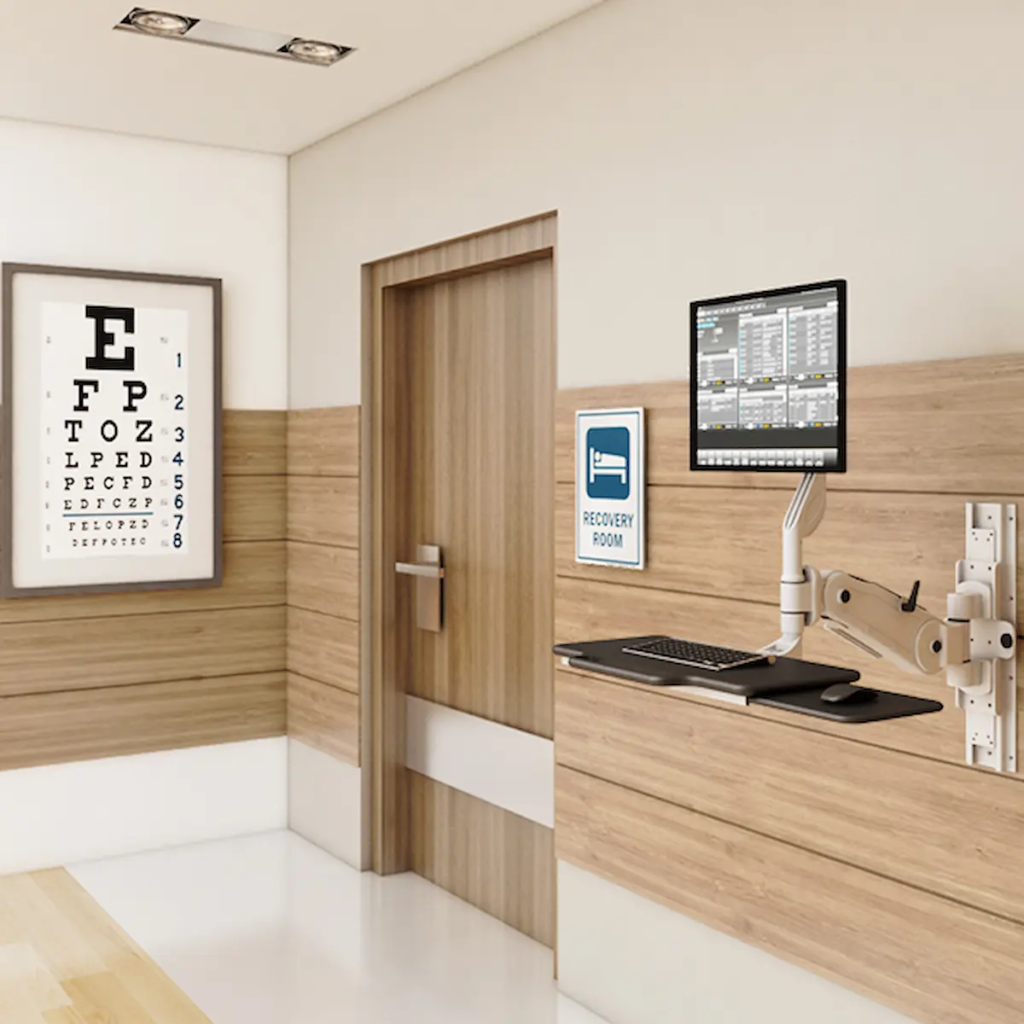
Common examples include hospital workstations, warehouse terminals, and compact home office setups.
In hospitals, wall-mounted systems allow quick access to patient data without cluttering critical spaces. In warehouses, they provide durable and accessible terminals for inventory management. At home, they create clean, distraction-free environments that maximize limited space.
Seeing how these setups function in real-world scenarios makes it easier to visualize how they could work for you.
What Problems Can This Setup Solve Immediately?
Wall mounted computers immediately reduce clutter, improve posture, and enhance workflow efficiency.
If your current setup feels disorganized or uncomfortable, this solution addresses those issues right away. By creating a dedicated, ergonomic workstation, you can work more comfortably and efficiently from day one.
If you’re ready to explore options tailored to your needs, you can always reach out through the Ergoville contact page (https://ergoville.com/contact/) for guidance.
Frequently Asked Questions
What is a wall mounted computer setup?
A wall mounted computer setup is a workstation attached to a wall to save space and improve ergonomics.
Are wall mounted computers ergonomic?
Yes, when properly installed, they promote better posture and reduce strain on the neck and back.
How much weight can wall mounts hold?
It depends on the system, but most are designed to support monitors, CPUs, and full workstation setups.
Can I install a wall mounted workstation myself?
Some systems allow DIY installation, but professional installation is recommended for complex setups.
{
“@context”: “https://schema.org”,
“@type”: “Article”,
“headline”: “Wall Mounted Computer: Save Space & Improve Workflow”,
“description”: “Discover how wall mounted computers save space, improve ergonomics, and boost productivity.”,
“author”: {
“@type”: “Organization”,
“name”: “Ergoville”
},
“publisher”: {
“@type”: “Organization”,
“name”: “Ergoville”,
“logo”: {
“@type”: “ImageObject”,
“url”: “https://ergoville.com/logo.png”
}
},
“mainEntityOfPage”: “https://ergoville.com/wall-mounts/”
}
{
“@context”: “https://schema.org”,
“@type”: “FAQPage”,
“mainEntity”: [
{
“@type”: “Question”,
“name”: “What is a wall mounted computer setup?”,
“acceptedAnswer”: {
“@type”: “Answer”,
“text”: “A wall mounted computer setup is a workstation attached to a wall to save space and improve ergonomics.”
}
},
{
“@type”: “Question”,
“name”: “Are wall mounted computers ergonomic?”,
“acceptedAnswer”: {
“@type”: “Answer”,
“text”: “Yes, when properly installed, they promote better posture and reduce strain.”
}
},
{
“@type”: “Question”,
“name”: “How much weight can wall mounts hold?”,
“acceptedAnswer”: {
“@type”: “Answer”,
“text”: “Weight capacity varies depending on the system but typically supports monitors and full workstations.”
}
},
{
“@type”: “Question”,
“name”: “Can I install a wall mounted workstation myself?”,
“acceptedAnswer”: {
“@type”: “Answer”,
“text”: “Some systems allow DIY installation, but professional installation is recommended for complex setups.”
}
}
]
}