
Workstation Accessories: How to Build a More Efficient and Ergonomic Workspace
How Do Workstation Accessories Improve Productivity and Comfort?
Workstation accessories improve productivity and comfort by optimizing ergonomics, organization, and accessibility.
Many workspaces look functional at first glance, but over time, small inefficiencies start to add up. Poor monitor positioning, tangled cables, and lack of proper support can lead to discomfort and slower workflows. The right accessories solve these problems by creating a more organized and ergonomic environment, helping users stay focused and efficient throughout the day.
What Workstation Accessories Do You Actually Need?
Which Accessories Make the Biggest Impact on Daily Work?
The most impactful workstation accessories are those that improve ergonomics, reduce clutter, and enhance accessibility.
Not every accessory is necessary, and adding too many can create more complexity than value. Instead, focusing on high-impact solutions ensures that your workspace remains efficient and easy to manage. Choosing the right combination of accessories can transform a basic workstation into a highly functional and comfortable setup.
1. Monitor Arms and Mounts
Monitor arms help position screens at the correct height and angle, reducing neck and eye strain.
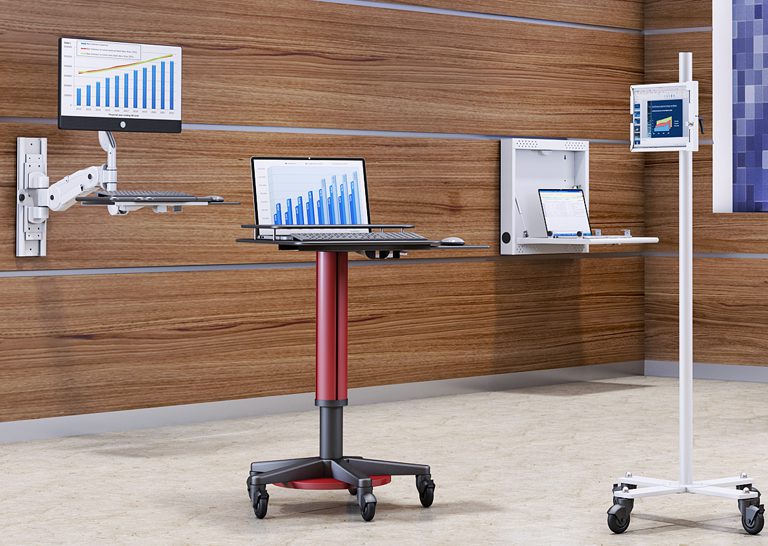
They are essential for maintaining proper posture and improving visibility, especially in multi-screen setups. Solutions like ergonomic mounts provide flexibility and precision for better screen positioning.
2. Cable Management Accessories
Cable management solutions keep wires organized and prevent clutter.
A clean workspace not only looks better but also improves efficiency by making it easier to access and maintain equipment. Organized cables reduce distractions and create a safer working environment.
3. CPU Holders and Mounting Solutions
CPU holders free up desk space and improve airflow around your equipment.
By mounting CPUs off the floor or desk, users can create more room for work while also protecting equipment from dust and damage.
4. Keyboard Trays and Ergonomic Add-ons
Keyboard trays and ergonomic accessories support proper wrist positioning and reduce strain.
These solutions are especially important for users who spend long hours typing, as they help prevent discomfort and repetitive stress injuries.
5. Storage and Utility Accessories
Storage accessories help keep essential tools and supplies organized and within reach.
An organized workspace reduces time spent searching for items and improves overall productivity.
6. Integrated Workstation Add-ons
Integrated add-ons combine multiple accessories into one cohesive system.
Pairing solutions like computer carts and medical carts allows users to create a fully functional and mobile workstation.
How Do You Choose the Right Workstation Accessories?
What Factors Should You Consider Before Buying Accessories?
Choosing the right workstation accessories requires evaluating compatibility, ergonomics, workspace layout, and workflow needs.
Start by assessing your current setup and identifying pain points. Consider the size of your desk, the number of devices you use, and how you interact with your workspace daily. Selecting accessories that align with these factors ensures that your setup remains efficient and easy to use.
How Do Accessories Work Together as a System?
Workstation accessories are most effective when they function as a connected system rather than individual add-ons.
For example, combining monitor mounts with cable management solutions creates a cleaner and more organized workspace. Thinking in terms of bundles or “frequently used together” setups helps ensure compatibility and maximizes the benefits of each component. Exploring custom products can further enhance integration and performance.
How Do Workstation Accessories Improve Efficiency and ROI?
Workstation accessories improve efficiency by reducing physical strain, improving organization, and streamlining workflows.
When users are comfortable and have easy access to tools, they can complete tasks more quickly and accurately. This leads to improved productivity and fewer interruptions. Over time, these benefits translate into a stronger return on investment.
Where Are Workstation Accessories Most Valuable?
What Real-World Use Cases Show Their Importance?
Workstation accessories are valuable across offices, healthcare environments, IT operations, and industrial workspaces.
In offices, they improve organization and comfort. In healthcare, they support efficient workflows and hygiene standards. In IT environments, they help manage equipment and cables. Their versatility makes them essential in any workspace where productivity and efficiency are priorities.
How Do Accessories Support Scalable Workspaces?
Workstation accessories support scalability by allowing setups to adapt to changing needs.
As teams grow or workflows evolve, accessories can be added or reconfigured without replacing the entire workstation. This flexibility makes it easier to scale operations and maintain efficiency over time.
Conclusion: Building a Smarter Workspace with the Right Accessories
Workstation accessories are more than just add-ons—they are essential tools for improving comfort, organization, and productivity. The right combination of accessories creates a workspace that supports both efficiency and long-term performance.
If you’re ready to upgrade your setup, explore workstation accessories or connect through the contact page to find the right solution for your needs.