
Best Mobile Workstations for Offices & Healthcare in 2026
Introduction
Mobile workstations have become essential tools for modern workplace flexibility. These height-adjustable, wheeled computer stations carry monitors, laptops, keyboards, and accessories wherever work happens. Whether you’re managing a corporate office in College Point, New York, or running a healthcare facility, the right mobile workstation transforms how your team operates daily.
This comprehensive guide covers mobile computer workstations for both office and healthcare environments. We’ve written it specifically for facility managers, IT professionals, and operations leaders seeking practical solutions. You’ll learn how to evaluate, select, and implement the best mobile workstations for your unique needs.
Here’s the direct answer: Mobile workstations are portable, height-adjustable computer stations on wheels that boost productivity, improve ergonomic health, and maximize space efficiency. They range from basic office carts to medical-grade units with battery power and infection-resistant surfaces.
By reading this guide, you’ll gain:
- Clear understanding of different mobile workstation types and configurations
- Knowledge to match workstation features to your specific environment
- Practical steps for assessment, selection, and implementation
- Solutions to common challenges that organizations face
- Confidence to make informed purchasing decisions
Understanding Mobile Workstations
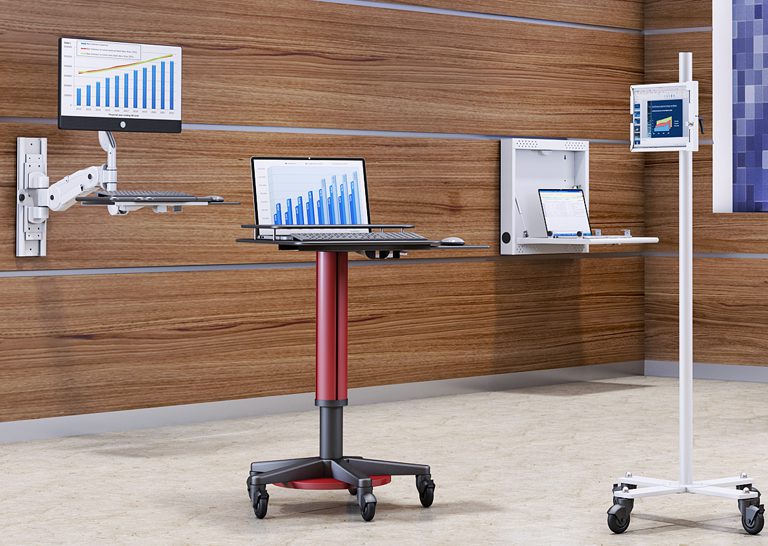
A mobile workstation is a wheeled platform designed to support computing equipment and a wide range of devices, such as laptops, desktop PCs, tablets, and other smart devices, while allowing users to work from virtually anywhere. These workstation computers combine mobility with ergonomic features that promote employee health and exceptional performance throughout the workday.
Modern mobile computer workstations serve diverse users—from nurses documenting at the bedside to professionals moving between conference rooms. They address a fundamental workplace challenge: bringing technology to where work actually happens.
Rolling Computer Carts
Rolling computer carts represent the foundational category of mobile workstations. Built from aluminum or cold-rolled steel, these carts feature antimicrobial powder-coated surfaces that resist corrosion and bacterial growth. Weight capacities range from 22 to 132 pounds, depending on configuration.
These portable workstation solutions excel at relocating compute resources quickly. They work equally well for basic office tasks and demanding applications in clinical settings. Quality models include locking casters, cable management systems, and stable platforms for monitors up to 27 inches.
Sit-Stand Mobile Desks
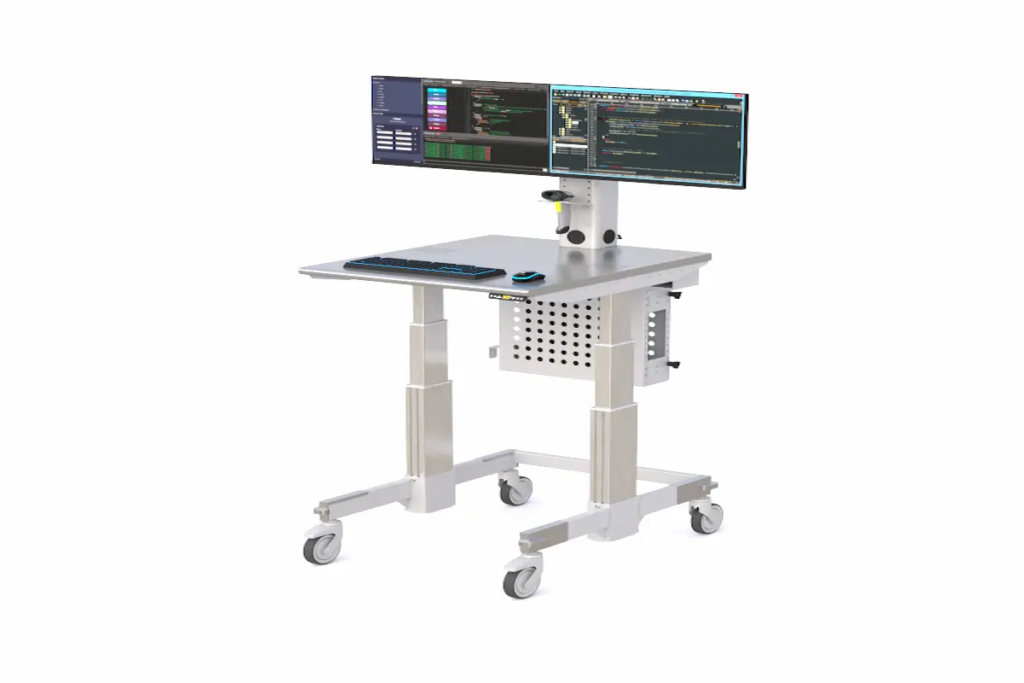
Sit-stand mobile desks add height-adjustability to the mobility equation. Users switch between sitting and standing positions using foot-pedal or electric mechanisms. Height ranges typically span 30 to 48 inches, accommodating users of various heights.
The ergonomic benefits are substantial. Research from healthcare usability studies shows that adjustable screen height and keyboard positioning reduce musculoskeletal strain. This directly supports employee wellness and sustained productivity during demanding workloads.
All-in-One Mobile Stations
All-in-one mobile stations combine multiple functionalities into self-contained units. These comprehensive systems include monitors, CPU holders, storage shelves, cable management, and often hot-swap LiFePO₄ batteries providing 8-12 hours of cordless operation. The long battery life of these mobile workstations enables extended portable work without frequent recharges, making them ideal for demanding tasks that require sustained use away from power sources. Compared to other models, this battery life range ensures users can rely on their workstation throughout a full workday in real-world scenarios.
This configuration delivers peak performance for users who need complete independence from wall outlets. Now, let’s explore how these workstation types apply to specific environments.
Office vs Healthcare Mobile Workstation Applications
Understanding your environment’s unique requirements ensures you select mobile workstations that deliver real value. The key factors differ significantly between corporate offices, healthcare facilities, and educational spaces.
Corporate Office Environments
Office settings demand mobile workstations that integrate seamlessly with existing technology infrastructure. Hot-desking arrangements require adjustable units that accommodate multiple users daily. Conference rooms benefit from mobile stations that support presentations and collaborative sessions.
Consider aesthetics alongside functionality. Cable management, compact footprints, and professional finishes matter in client-facing spaces. Power management should align with your office layout—cordless options eliminate trip hazards during meetings. Ergoville’s mobile workstation collection includes configurations tailor made for modern office environments.
Healthcare Facility Needs
Healthcare environments place unique demands on mobile workstations. Infection control drives material selection—antimicrobial surfaces must tolerate bleach and hydrogen peroxide cleaning protocols. Standards like ASTM E2149-22 and ISO 22196 guide surface requirements, with seam gaps limited to 0.3mm to prevent biofilm formation.
Nurses spend approximately 35% of their shifts on documentation. Mobile workstations reduce walking time between patient rooms and nursing stations, shifting more time to direct patient care. Real-time EMR access at the bedside improves medication accuracy and workflow efficiency.
Educational and Training Spaces
Training environments require adaptable solutions that support various formats. Mobile workstations enable instructors to demonstrate software applications, display vibrant colors on quality monitors, and move equipment between classrooms effortlessly.
Dual-monitor configurations work well for side-by-side comparisons during instruction. Lightweight designs ensure that staff can reposition equipment without strain. These applications demonstrate the versatility that makes mobile workstations valuable across industries.
Selecting and Implementing Mobile Workstations
Successful implementation starts with systematic assessment. Organizations that skip planning often face costly adjustments later. Here’s how to approach the process strategically.
Assessment and Planning Process
Follow this four-step process for optimal results:
- Space Analysis: Measure corridors, doorways, and room dimensions. Map traffic patterns and power outlet locations. Ensure selected carts fit through all required spaces.
- User Needs Assessment: Identify who uses workstations, their height range, primary tasks, and environmental factors. Survey staff about current pain points.
- Technology Requirements: Determine device types (monitors, printers, barcode readers), power preferences (corded vs. battery), and integration needs with existing systems.
- Budget Planning: Calculate total lifecycle costs including purchase price, maintenance, battery replacement, cleaning supplies, and training.
Configuration Comparison Table
| Criterion | Basic Office Grade | Premium All-Round | Medical-Grade |
| Height Range | 30–48 inches | 28–48+ inches | 30–48 inches |
| Weight Capacity | 22–55 lbs | 55–132 lbs | Variable by configuration |
| Storage Options | Laptop shelf, keyboard tray | Dual monitor mounts, CPU holder, baskets | Secure drawers, barcode holders |
| Special Features | Locking casters, manual lift | Electric lift, antimicrobial finish, battery options | IP ratings, infection control surfaces, hot-swap batteries |
Use this comparison to match workstation computer configuration to your specific requirements. Contact Ergoville for personalized guidance on selecting the right configuration for your facility.
Mobile Workstation Security and Data Protection
Mobile workstations deliver exceptional performance and processing power for professionals handling demanding tasks including video editing, data analysis, and content creation. These high-performance machines require robust security and data protection as their mobility and capabilities expand. Mobile workstations store and process sensitive information in offices and healthcare environments, creating critical vulnerabilities to unauthorized access and cyber threats. Security implementation for these systems directly impacts productivity, reliability, and business continuity.
Safeguarding Sensitive Information in Mobile Environments
Mobile workstation security requires a structured approach to data protection. Implement strong, unique passwords across all systems—this forms the foundation of device security. Enable full-disk encryption to prevent unauthorized access to confidential files. Install reputable anti-virus and anti-malware software for real-time protection against evolving cyber threats. Exercise caution on public Wi-Fi networks by using secure, encrypted connections and avoiding sensitive data transmission over unsecured channels.
HP Wolf Security delivers advanced protection specifically designed for workstation laptops. The solution provides real-time threat detection and automated response capabilities against malware and phishing attacks. This security suite ensures comprehensive protection across all mobile environments—office, home, or remote locations. Organizations significantly reduce data breach risk by combining robust software solutions with user awareness and safe browsing practices.
Security Features and Best Practices
Mobile workstation selection requires four core components for optimal performance and security. Windows operating systems provide essential security features and consistent updates. Intel Core processors deliver superior performance—the Intel Core i7 series offers the best balance of speed and security capabilities. Solid state drives (SSDs) ensure fast data access and improved reliability. ECC RAM maintains data integrity for demanding workloads in data science and complex computational tasks.
Business environments benefit from Intel vPro technology. This enterprise-grade solution provides advanced security and centralized management for workstation computers. High-performance graphics cards like Nvidia RTX or AMD Ryzen support both visual-intensive applications and secure, hardware-accelerated workflows. These components enable seamless design software operations and content creation while maintaining security standards.
ISV certification ensures compatibility with professional applications. This certification validates performance with demanding software used in graphic design, artificial intelligence, and data analysis. Proper hardware and software configuration creates a compact powerhouse that delivers mobility, speed, and security. The right configuration matches specific workflow requirements.
Mobile workstation security requires integrated hardware, software, and user practices. Advanced hardware components combined with secure software and proper implementation deliver exceptional productivity, reliability, and flexibility. These systems maintain high data security standards across all environments. Whether deployed in offices, healthcare facilities, or mobile settings, properly configured workstations enable secure, confident operation.
Common Challenges and Solutions
Even well-planned implementations encounter obstacles. Here are practical solutions to the most frequent challenges organizations face.
Space Constraints and Storage
Tight corridors and limited storage space frustrate many organizations. Choose compact designs with slim bases—quality units measure approximately 21 inches wide by 19 inches deep. Fold-down trays and telescoping arms maximize functionality without expanding footprints.
Technology Integration Issues
Power management and cable clutter create ongoing headaches. Battery-powered units with hot-swap capability eliminate cord-related trip hazards. VESA-compatible mounts ensure monitor compatibility. Most mobile workstations are equipped with dedicated graphics rather than integrated graphics, providing superior performance for demanding professional tasks. Built-in cable management channels keep workspaces organized and professional.
User Adoption and Training
Staff resistance undermines even the best equipment investments. Address this through hands-on training sessions, ergonomic education, and designated “champions” who model proper use. Involving users in selection increases buy-in and ensures chosen features match actual needs.
Conclusion and Next Steps
Mobile workstations deliver measurable benefits: improved workflow efficiency, better ergonomic health, and smarter space utilization. The right selection process matches workstation capabilities to your environment’s specific demands—whether you’re equipping a corporate office or healthcare facility.
Take these immediate actions:
- Schedule a workspace assessment with Ergoville’s team to evaluate your current setup
- Request product demonstrations to experience different configurations firsthand
- Explore current special offers on mobile workstations
For related ergonomic solutions including standing desks and monitor arms, visit Ergoville’s main site to explore comprehensive workspace equipment options.
Frequently Asked Questions
What is the average cost of mobile workstations for healthcare settings?
Healthcare-grade mobile workstations typically range from $1,500 to $5,000+ depending on features. Medical configurations including antimicrobial surfaces, battery systems, and locking drawers command premium pricing. Lifecycle costs include battery replacement every 3-5 years and regular maintenance.
How do you properly clean mobile workstations for infection control?
Use EPA-registered hospital-grade disinfectants compatible with cart materials. Follow manufacturer guidelines for contact time. Clean high-touch surfaces between users and conduct thorough cleaning at least twice daily in clinical settings. Avoid pooling liquids near electronics.
What ergonomic features matter most in mobile workstations?
Research identifies three critical features: smooth wheel function for easy mobility, adjustable screen height matching eye level, and stable keyboard/mouse positioning. Height adjustability (sit-stand capability) reduces static posture strain during extended use.
How long do mobile workstation batteries typically last?
Quality LiFePO₄ batteries provide 8-12 hours of continuous operation per charge. Hot-swap systems allow battery replacement without shutting down equipment. Most batteries maintain capacity for 1,500-2,000 charge cycles before needing replacement.
Are mobile workstations suitable for small offices with limited space?
Absolutely. Compact models with footprints under 22 inches wide work well in tight spaces. Fold-down features and wall-mountable charging stations help maximize limited square footage while maintaining full functionality.
What certifications should healthcare mobile workstations have?
Look for antimicrobial surface testing per ASTM E2149-22 and ISO 22196 standards. Medical device certifications vary by equipment mounted on carts. UL listing for electrical components and materials rated for hospital-grade disinfectants are essential.
How do mobile workstations improve productivity in offices?
Mobile workstations eliminate travel time between fixed stations, enable spontaneous collaboration, and support flexible work arrangements. Users complete documentation where work happens rather than returning to dedicated desks, reducing workflow interruptions.
Which mobile workstations are best for graphic designers?
Graphic designers need high-performance machines with color-accurate displays, powerful GPUs, and high-resolution screens to handle digital art, multimedia editing, and design workflows. Models like the HP ZBook are specifically engineered to deliver the raw power required for demanding creative tasks, making them an excellent choice for professionals in graphic design.
Can Ergoville help configure mobile workstations for my specific needs?
Yes. Ergoville provides personalized consultation for organizations in College Point, New York and surrounding areas. Their team assesses your space, understands your workflow requirements, and recommends configurations that match your budget and operational needs.