
Floor Post Stands for Modern Workspaces
Introduction
Post stands have become essential fixtures in today’s dynamic work environments. These vertical mounting structures provide flexible, adjustable solutions for displays, monitors, and equipment organization. As workplaces continue evolving, the demand for adaptable furniture solutions has never been higher.
This guide covers floor post solutions designed for office environments. We focus on adjustable mounting systems, ergonomic benefits, and practical applications. However, we exclude permanent construction fixtures and built-in cabinetry. Office managers, facility planners, and ergonomic specialists in College Point, New York—and beyond—will find actionable insights here.
So, what exactly do post stands offer? They provide height-adjustable, space-efficient mounting solutions that create dynamic workspaces. Moreover, they support proper posture while maintaining professional aesthetics.
By reading this article, you’ll learn about:
- Improved workspace flexibility through modular configurations
- Enhanced ergonomics that reduce strain and boost productivity
- Cost-effective alternatives to permanent installations
- Easy installation processes for various floor types
- Professional design options that coordinate with modern offices
Understanding Floor Post Stand Systems
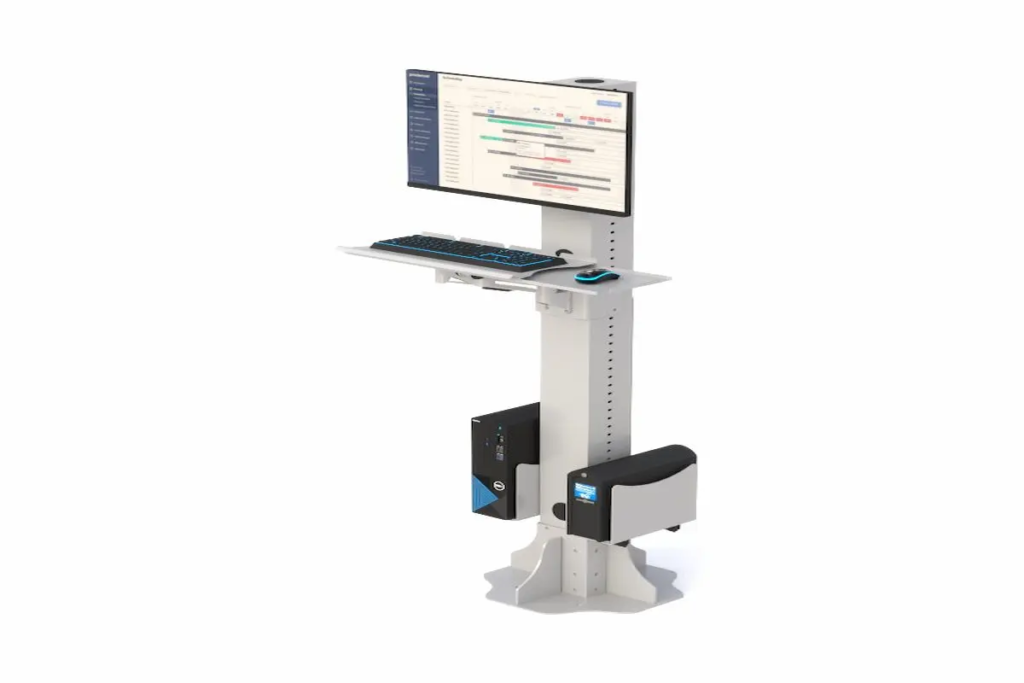
A post stand is an adjustable mounting solution anchored to the floor. It supports displays, keyboard trays, and accessories through a vertical structure. In contemporary workspace design, these systems meet growing demands for flexibility and employee wellness.
Stand Post Configurations
Single-post configurations use one vertical pole. They’re ideal for lighter loads and smaller footprints. Multi-post systems, however, provide greater stability for heavier equipment. The choice depends on your specific needs.
Single-post options fit well in compact spaces. Meanwhile, dual-post bases offer structural integrity for large displays up to 65 inches. Understanding these configurations helps optimize your workspace layout and equipment mounting strategy.
Post Up Stand Mechanisms
Height adjustment systems vary considerably. Gas-spring mechanisms allow smooth vertical motion, typically ranging from 55 to 70 inches. Additionally, telescoping posts offer fixed increments or continuous adjustment.
Stability features include reinforced steel bases and floor plates. These bases ensure the post base remains secure under load. Furthermore, quality stands support weights from 40 lbs per arm to over 160 lbs for heavy-duty models.
The relationship between adjustability and ergonomics is clear. Proper height settings reduce neck strain significantly. Now, let’s explore how these foundations translate into practical workplace applications.
Applications in Modern Workspace Design
Building on these foundational concepts, floor post systems transform various work environments. They create organized, ergonomic spaces while maintaining aesthetic appeal.
Monitor and Display Mounting
Dual monitor setups have become standard in many offices. Post stands support these configurations with VESA-compatible mounts ranging from 75×75 mm to 600×400 mm. Presentation displays benefit from adjustable heights and tilt options. Consequently, viewing angles improve for both seated and standing users.
Equipment Organization Systems
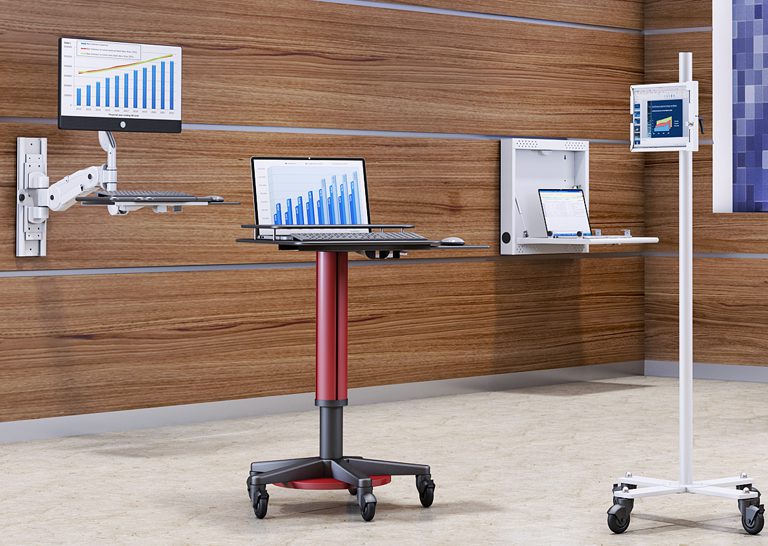
Beyond displays, these systems organize entire workstations. Tablet mounts, CPU holders, and keyboard trays attach to the same post. This consolidation reduces clutter and maximizes floor space. As a result, workplaces function more efficiently.
Collaborative Workspace Solutions
Mobile presentation stands transform meeting rooms instantly. Locking casters provide security while allowing repositioning. Flexible configurations support hot-desking and collaboration zones effectively.
Key benefits include: space optimization, improved collaboration, and adaptable room layouts. With these applications understood, let’s examine implementation procedures.
Installation and Setup Procedures
Installing floor post systems requires careful planning. However, the process is straightforward with proper preparation.
Floor Post Base Installation Process
Choose floor-mounted solutions when displays must be elevated beyond desk height. They’re also preferred when avoiding wall modifications or requiring mobility.
- Site Preparation: Assess floor type—concrete, wood post connections, or raised flooring. Verify load capacity and proximity to power sources.
- Component Selection: Match stand specifications to your equipment. Consider display sizes, VESA patterns, and accessory requirements.
- Base Installation: Position and anchor the post base securely. For concrete floors, use appropriate fasteners. Ensure the structure is level and flush with the surface.
- Equipment Mounting: Attach displays and accessories using provided hardware. Route cables through integrated channels for a clean appearance.
- Final Adjustments: Test height ranges and stability. Adjust for typical user heights and viewing preferences.
Post Stand Comparison Guide
| Feature | Fixed Height | Adjustable | Single Post | Dual Post |
| Flexibility | Limited | Excellent | Good | Good |
| Weight Capacity | High | Moderate-High | Up to 50 lbs | 100+ lbs |
| Best For | Signage | Workstations | Light displays | Large screens |
| Installation | Simple | Moderate | Quick | More involved |
Choose adjustable models for shared spaces. Select dual-post configurations when structural integrity matters most for heavy displays.
Common Challenges and Solutions
Successful implementation requires addressing potential obstacles proactively.
Stability, Structural Integrity, and Weight Distribution Issues
Select bases with adequate footprint for your equipment weight. Ensure load ratings exceed actual requirements by 20-30%. Additionally, anchor points must coordinate with floor construction materials.
Height Adjustment and Ergonomic Positioning
Position screen tops at eye level or slightly below. Maintain viewing distances of 20-30 inches. Gas-spring mechanisms simplify frequent adjustments between users.
Cable Management and Aesthetics
Integrated cable channels maintain professional appearance. Choose finishes and color options that match your office design. Power strips mounted directly on posts reduce cord clutter effectively.
These solutions ensure your investment delivers maximum value. Now, let’s summarize the key takeaways.
Conclusion and Next Steps
Floor post stands offer transformative benefits for modern workspaces. They provide flexibility, enhance ergonomics, and maintain professional aesthetics—all while being cost-effective alternatives to permanent installations.
Ready to upgrade your College Point, New York workspace?
- Assess your current equipment and space requirements
- Explore Ergoville’s floor post stands collection for options that fit your needs
- Place your order easily online or coordinate your order with our team for bulk discounts and a smooth purchasing process
- Contact our team for personalized recommendations
- Check our limited special offers for current deals
For more ergonomic workspace solutions, explore additional products at Ergoville. We offer a variety of sizes and configurations designed to meet diverse project requirements.
Frequently Asked Questions
What weight capacity should I look for in post stands?
For dual monitor setups, choose stands rated for 40 lbs per arm minimum. Heavy-duty models support up to 80-110 kg for larger displays. Always add a 20-30% safety buffer above your actual equipment weight.
Can post stands be installed on wood floors?
Yes, wood post installations are common. Use appropriate anchors designed for wood construction. Verify floor strength and add reinforcement if needed for heavy equipment.
How do post stands improve workplace ergonomics?
They allow precise height adjustments for proper viewing angles. Screen tops should sit at eye level, reducing neck strain. Adjustable keyboard trays maintain proper arm positioning throughout the workday.
Are mobile post stands stable enough for large displays?
Quality mobile stands with locking casters support displays up to 65 inches safely. However, anchor-mounted options provide superior stability for permanent installations.
What VESA pattern compatibility do I need?
Standard monitors use 75×75 or 100×100 mm patterns. Larger displays require 200×200, 400×400, or 600×400 mm compatibility. Check your monitor specifications before making a purchase.
Are post stands or post bases suitable for pergolas?
Yes, certain post bases are specifically designed for structural support in outdoor projects, including pergolas. These iron post bases offer strength, durability, and a secure fitment for pergola frameworks, making them ideal for supporting and stabilizing pergolas and similar outdoor structures.
“`html id=”poststands2026″
“`